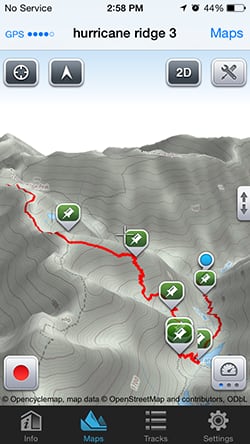
I had heard there was a small glacier-fed lake down there with good fishing and great spots to pitch a tent for the night. It sounded like just the place to take the kids on their first real backpacking trip.
I zoom in, and with a little finger-dance on my iPhone touchscreen, fly down the valley and around a rocky spur. Yep, there it is: Grand Lake. Time to pack up my ruck and go have a look.
Welcome to Maps 3D, the $4.99 app that just might fix everything you hate about navigating in the mountains, even while giving you a few things to love.
more
Today's GPS-enabled phones have made the idea of getting lost almost quaint. And, of course, 3-D mapping is nothing new. But when it comes to getting from Point A to Point B out in the mountains, Siri and Google are lost without a decent Internet connection. And anyone who's made it through even the most basic military land-nav course knows that a pretty 3-D rendering will never provide the level of detail that comes with a good-old-fashioned topographical map.
But an app that brings it all together — the routing ease of Google Maps with the detail of a topo map, that will show not just your general location, but pinpoint exactly where you are on a 3-D mountainside as you make your way around that rocky spur — well, that's pretty cool.
If it works.
Mapping it out
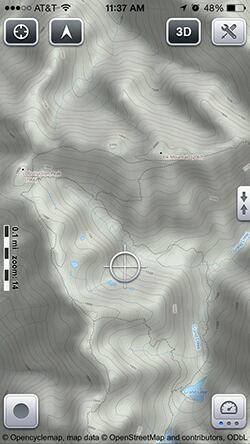
They range from three basic topographical sets to maps geared specifically to hikers, skiers and even boaters, plus satellite maps and the same city and highway driving maps used by MapQuest.
The default download is "Topo II" with all the standard concentric loops of elevation gain, roads and trail markings you'd expect in any good topographical map.
According to the developers, the maps are drawn from a pool of open-source libraries, including Open Street Maps, a kind of Wikipedia of worldwide mapping, and combines them with NASA-built 3-D scans of the Earth.
And, yes, map coverage is worldwide. Spot checks on areas of Afghanistan looked well-detailed.
It's a little confusing at first, but the app also breaks down the 11 map types into three scale — or resolution — settings: Overview, Standard and Detail.
All of 1,400-square-mile Olympic National Park in Overview is a 9 megabyte download. But drill down into Standard, and it becomes 117MB; and download the Detail version, and it becomes a whopping 1.7 gigabytes.
But you decide how much — and which — to download. A simple drag-and-drop cropping tool makes it easy. For my purposes, the Topo II Overview version of the National Park, paired with the Detail version for the pocket I'd be hiking in — about another 9MB — was perfect. One for driving, the other for the hike.
For some visual variety, I downloaded the same two sets of satellite imagery, with about the same cost in storage space.
Once your maps are downloaded, it's easy to switch between them. The small button in the upper left corner of the screen toggles between standard 2-D top-down view and 3-D.
Typical pinch and pan moves make it easy to zoom in and glide around the map, though it took me a while to figure out that I could use a two-finger drag to change the angle of the 3-D view like a third-person shooter, shifting from a down-low, almost eye-level vantage all the way to full top-down mode.
Planning
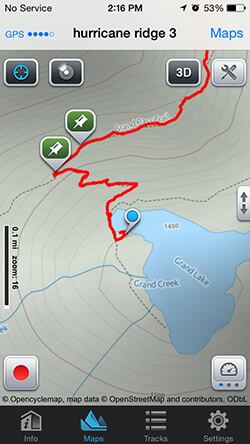
I wanted to do a down-and-up loop from the dead end of a long, bumpy dirt road deep inside the park, a trailhead aptly dubbed Obstruction Point. The plan was to follow the ridgeline out for a while, eventually dropping into the valley to Grand Lake, then follow the valley downstream for a few miles and make my way back up a steep couloir.
I only needed to mark four "route points" for the app to calculate the trip, which turned out to follow the National Park's backcountry trail system.
The router estimated the hike would be 8 miles in distance with 3,400 feet of total elevation loss and gain, with a "profile" pop-up graphing out the ups and downs along the way. In this case, it looked like one wide, if jagged, V.
On the go
After noting the warnings about bears, cougars and unruly mountain goats at the trailhead, I pressed the record button at the bottom left of the app and started tracking my progress.
This works just like many running and biking apps for tracking workouts (think RunKeeper and Cyclemeter), not only recording your actual route taken, but also displaying a real-time dashboard of performance data including current and average speed, distance and time traveled.
But this is the mountains, so you're getting readouts on ascent and descent, slope and more displayed in a simple slide-left-and-right window.
You can also record specific waypoints, with all the expected data, along with options to embed notes and any pictures you snap along the way.
And then, of course, there's that little dot following you down the path. For the navigation-challenged, basic GPS is a godsend, but even the most skilled, triangulating, azimuth-shooting map whisperers out there will appreciate the situational awareness that comes with seeing your position in real time on a 3-D map. It's one thing to see a bunch of tightly packed contour lines on a good topo map. It's another thing entirely to transform them into an accurate image of the steep drop just ahead along the trail you're following.
And this Maps 3D does supremely well.
Plummeting performance?
My two biggest concerns were that accuracy would plummet as I dropped into the steep valley and that battery drain would leave me mapless halfway through the hike.
While update settings can be adjusted manually, I found the default for hiking — every 12 seconds — was spot on. Every time I crossed a stream or hit any other major terrain feature to compare against, it had me right there the moment I pulled up the app.
Even down in the deepest part of the valley, and under the thickest tree cover, position updates were quick and accurate. It was quite a departure from the frustration of slowly updating GPS while driving through urban canyons.
Battery drain, however, was a close call. The trip recorder put my total hike at 5 hours, 46 minutes. Starting with a completely topped-off iPhone 5s, I was down to 7 percent by the time I got back to the trailhead.
That was better than I expected, but not great. That said, I also shot a few dozen pictures, including screen grabs of the app, along the way and was checking the app more than I normally would. Because maps are downloaded, power suck is far less than what most are used to with the more common phone-driven map apps that download content on the fly.
The developers say if the app is run mostly in background mode, you can expect more than 10 hours of use on an iPhone before needing to recharge. That sounds about right.
Either way, I'd pack a spare pocket charger or two.
Compared with my route planner track, the overall hike registered at 9.39 miles, more than a mile longer than the estimate, but only 200 feet shy of the estimated total elevation gain/loss.
My guess is the app had a harder time accounting for the super-tight switchbacks up the couloir when mapping the final leg and that the actual track got it right. Either way, in terms of total elevation, it was the equivalent of hiking up and down the Empire State Building three times, so it certainly felt longer than 8 miles.
Sharing
Like other GPS fitness apps, Maps 3D does a good job of integrating with social media when you're back from your adventures. The share button allows you to email or post bragging rights on Facebook and Twitter, with the basic details of the trip along with a link that opens to Google Maps with an overlay of your route. All your waypoint photos are embedded, too.
Pro photography tip: I was happy to see Maps 3D tracks can import directly into The Photographer's Ephemeris, my go-to app for figuring out when and where the best light will be for shooting. Just email your track to yourself, and select from the "open in" options.
Maps GPS also integrates with the popular user-generated geo-tagged travel site Every Trail so you can download trips and tracks saved in there directly into the app. It's a great way to discover new hikes and then import them into the app for a 3-D look around. Then, if you like what you see, go check it out for yourself.
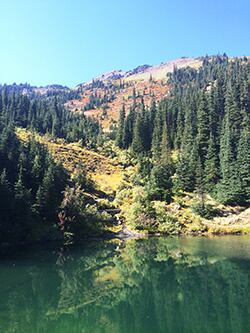
They're already excited. It's one thing to tell them about it, another thing to show them in 3-D.
In short, Maps 3D works extremely well. While there's room for improvement — the interface is somewhat clunky and battery drain could be improved — overall, this app exceeds expectations.
If you're a fan of fitness apps such as RunKeeper but want something that works better in the mountains along with the visual bragging rights of 3-D tracks of your out-in-the-wilds exploits, this is just what you've been looking for.